Your guest list already exists. Most restaurants never email it.
Every restaurant on a real reservation system is sitting on a guest list most retailers would envy — names, emails, visit history, spend, what they celebrate, how often they come back. Almost none of it gets used. Building a newsletter means exporting a CSV into Mailchimp or Brevo, hoping the export isn't stale, designing an email from scratch, and manually building a list every single time. So it doesn't happen, and the guest who came six times last year quietly stops coming back with no one ever hearing from the restaurant again.
Bistromail is Bistrochat's own email marketing platform, built directly on top of the CRM that already runs a restaurant's bookings. There is no export, no sync, no second system to keep in sync with the first. Guests, tags, visit counts and spend are already there the moment Bistromail is opened, in real time, per venue.
What is Bistromail?
Bistromail is an email marketing and marketing-automation tool built into the Bistrochat restaurant platform. It lets restaurant owners and managers:
- Turn a newsletter into an editable email in minutes — by importing an existing design, or by chatting with an AI assistant that writes and edits it
- Send one-off campaigns to smart, always-up-to-date audiences (regulars, lapsed guests, VIPs, big spenders…) or to hand-picked lists
- Automate recurring emails — birthday wishes, win-back messages, no-show and cancellation follow-ups — that run on their own once turned on
- See which bookings, covers and revenue each campaign and each automation actually brought back
- Capture new subscribers straight into the CRM from a signup widget on the restaurant's own website
Every part of it works off the same guest data as the reservation book, so there is nothing to import, no list to keep current, and no second customer database to reconcile.
A newsletter from a picture, a file, an email, or a blank page
Most restaurants already have marketing material somewhere — an old Mailchimp campaign, a PDF flyer from a printer, a poster designed once in Canva. Bistromail's import turns any of that into a fully editable email:
- A picture (PNG, JPG, WebP) or a screenshot of a design
- A PDF (its first 8 pages)
- HTML pasted directly, or a
.zipexport from Mailchimp, Brevo, Klaviyo or Constant Contact - A saved
.emlemail file - Forwarding an email — every venue gets its own personal import address; forward any newsletter to it and it shows up in Bistromail, ready to review
- The link to a public Instagram post — the caption and pictures become the newsletter copy automatically
- One of the restaurant's own Events on Bistrochat, turned into an announcement with dates, seatings and a booking button
- One of the restaurant's own WhatsApp Business templates, turned into an email with the same header image and message
Whatever the source, an AI engine reads the layout — separating text from artwork, matching fonts, keeping logos and photos intact — and rebuilds it as a set of editable blocks: headers, text, images, buttons, dividers, menu cards. The rebuilt version is shown side by side with the original before anything is saved, so nothing goes out unreviewed. The restaurant's own logo and an unsubscribe link are always added; nothing designed by someone else is ever sent as-is without them.
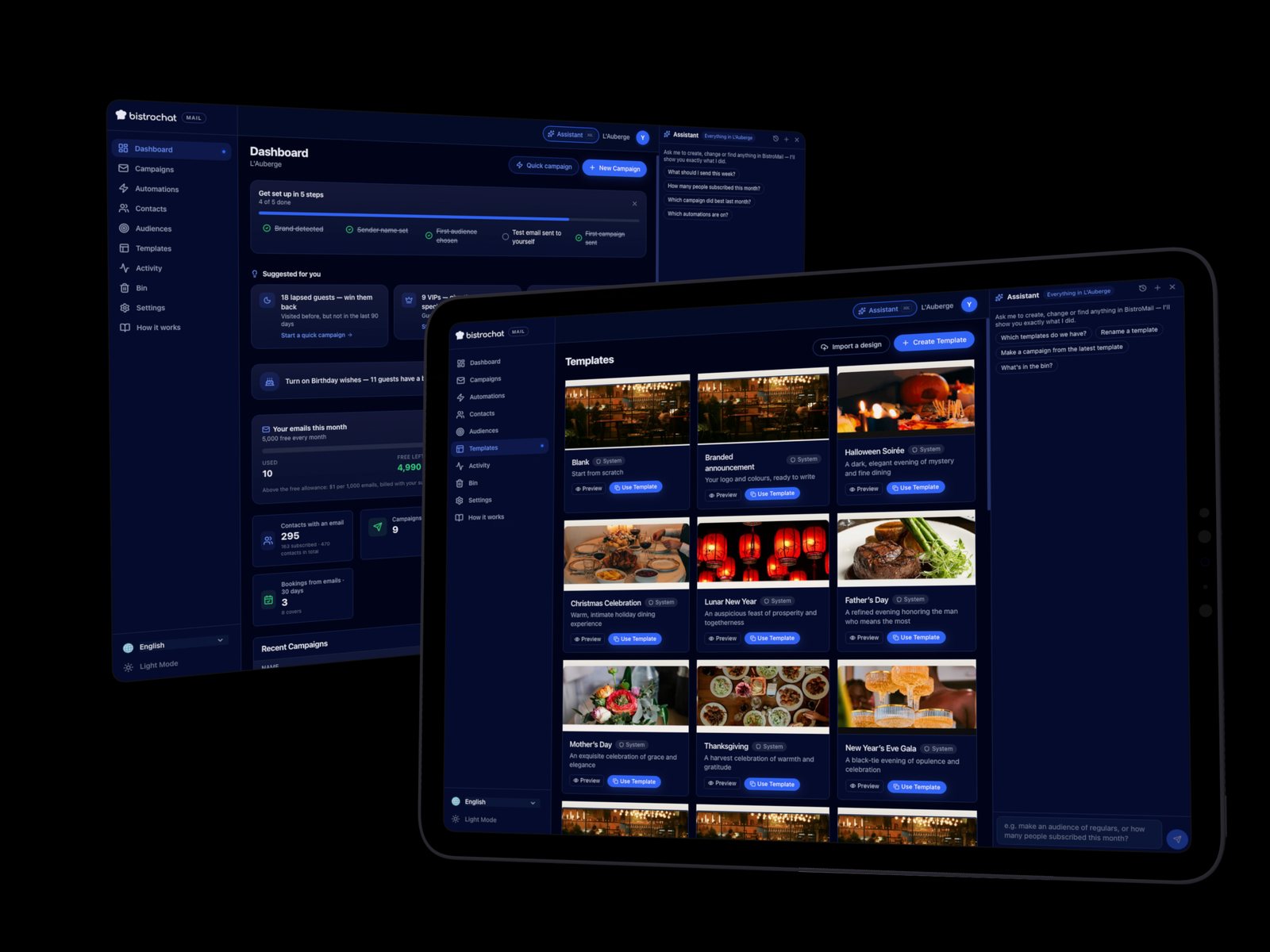
For a blank start, Bistromail ships nine ready-made templates — a blank canvas, a branded announcement, and seven seasonal designs (Halloween, Christmas, Lunar New Year, Father's Day, Mother's Day, Thanksgiving, New Year's Eve) — every one of them automatically wearing the venue's own logo, brand colours and hero photo the moment it's opened, with nothing to configure first.
An AI assistant that edits the email for you
Next to every template is a chat panel. Instead of hunting through a properties panel, a manager can just say what they want — "make the header darker," "put the menu in two columns," "add a button that says Book a table," "make this section warmer and shorter" — and the assistant rewrites the email live on the canvas. Selecting a block first lets the instruction refer to "this one" specifically. Every reply is a single, one-tap Undo.
The same assistant creates and edits pictures for the email: describe an image ("a summer terrace at dusk, warm light, no text") and it generates one, kept afterwards in the venue's own picture library for reuse; ask it to change an existing picture ("remove the text," "make it square," "warmer light") and it edits that picture directly. Style, scene, mood, shape and framing are also available as tappable suggestion chips for anyone who isn't sure what to ask for, and up to five reference images or PDF pages can be attached as a style guide for the AI to follow, without being copied outright.
Every image field also has a picture library (the venue's own uploads, AI creations and past picks), a built-in stock-photo search, and a plain upload button — so building a visual newsletter never depends on having a designer on staff.
Audiences that update themselves
A campaign's audience in Bistromail is a live rule, not a static export: Regulars (three or more visits), Lapsed guests (haven't visited in 90 days), New guests (first visit in the last 30 days), Haven't heard from us (no Bistromail email in 60 days), Top spenders (top 10% by lifetime spend), and VIPs (tagged as such in the CRM already used for service). Every preset is evaluated fresh at the moment a campaign is reviewed and again at the moment it sends — a guest who becomes a regular the day before a send is included; one who unsubscribes the hour before is not.
Any rule can also be frozen into a fixed list — the exact people at that moment, saved for reuse — for the rare case where an exact snapshot is what's needed instead of a rule. Both kinds carry the same consent guarantees: a fixed list is re-checked against opt-in status and unsubscribes at send time, never a way around them.
Every campaign is also sent to one of two audiences by choice: guests who explicitly opted in to marketing, or everyone with an email address on file, with the reachable number shown live either way.
Automations: set them once, they run every day
This is where Bistromail moves from "a newsletter tool" to "marketing that runs itself." An automation is one plain-English sentence — when this happens to a guest, send that email — built from a short list of recipes:
- Birthday wishes, sent ahead of a guest's birthday
- Win back, in three tiers (3, 6 and 12 months quiet), each with its own message
- Tag added, the moment staff tag a guest in the CRM (a new regular, a wine lover, anything the floor already tracks)
- No-show follow-up, a gentle nudge if a missed booking hasn't been rebooked
- Cancellation follow-up, inviting a guest who cancelled to pick a new date
- Big spender, thanking a guest once their lifetime spend crosses a threshold
- Loyal guest, marking a visit-count milestone
Each automation is built in three steps — pick the trigger, pick (or duplicate) the email to send, adjust a couple of settings as plain-English chips — with sensible defaults good enough to turn on with zero edits. Underneath, Bistromail enforces the rules that keep this from becoming spam: a per-guest cooldown so nobody gets the same automated email twice for the same reason, a frequency cap across every automation and venue in a group so one guest never gets flooded from several rules at once, and a ranking between automations so only the highest-priority match sends when a guest qualifies for more than one. Automations only ever reach guests who opted in.
Proof it works: every automated email tied back to a booking
Bistromail doesn't just send and hope. Every campaign and automation tracks opens, clicks, bounces and unsubscribes on its own — no third-party analytics needed — and goes one step further: it connects sends to actual bookings. A reservation counts as revived by an email when it was made within a set window after that email (30 days by default, adjustable per venue) and either the booking carried that email's link or the guest had opened the email first. Where the venue's point-of-sale is connected, the revenue from that booking is counted too.
That number — bookings and covers revived, revenue where available — shows up on every campaign's own report, on each automation card, on the dashboard for the trailing 30 days, and in the restaurant's monthly owner report alongside its other performance data. A restaurant can see, in plain numbers, that turning on "Win back" brought back a specific count of guests and a specific number of covers, not just that an email went out.
A "Join our newsletter" widget for the restaurant's own website
New subscribers don't have to come from an existing guest list. Bistromail generates a signup widget for each venue — an embeddable snippet for the restaurant's own website, a hosted signup page, and a QR code for printed materials (a table tent, a receipt, a window sticker). A guest who signs up gives their email and phone (name optional) and lands straight in the CRM as an opted-in contact, ready for the very next campaign or automation — no spreadsheet, no manual add.
Testing what works, automatically
Not sure which subject line will get opened? Bistromail can test two subject lines against each other automatically: a fifth of the audience is split evenly between the two, and after a short wait the version with more unique opens (clicks break a tie) is sent automatically to everyone else. Nothing to monitor and no manual follow-up send — the winner is chosen and the rest of the list gets it.
Built for how restaurants actually send email
- Consent-first, always. Only guests who explicitly opted in to marketing (or, if the sender chooses, everyone with an email on file) can be selected for a campaign; unsubscribes and bounces are excluded from both. Once a guest unsubscribes, only they can opt back in — Bistromail never lets staff re-subscribe someone on their behalf, because that is exactly the pattern that gets a sender penalized by mailbox providers.
- A dedicated sending domain, authenticated end to end, with each venue getting its own recognisable sending address and reply-to, monitored bounce and complaint rates, and automatic failover across sending infrastructure so a single provider hiccup never stops a campaign mid-send.
- A generous free allowance. Every venue includes 5,000 free emails a month, and restaurant groups pool it across every venue they run — two venues share 10,000, three share 15,000, and so on. Usage, what's left, and the reset date are shown throughout the product; going over the free allowance simply adds a small per-1,000 cost, shown before anything is sent.
- Every time shown is the venue's own local time — the report chart, the send schedule, the activity log — so a restaurant group spanning several countries or time zones always reads its own clock, never a browser's.
- Multi-venue and multi-brand from day one. A restaurant group manages every venue's campaigns, templates and automations from one login, with its own per-venue sending address and branding, while separate companies connected to the same account never see or share each other's guests, templates or campaigns.
How it works
Bistromail is part of the Bistrochat platform, included with the Bullish plan: any Bullish restaurant already using Bistrochat for reservations has its guest list, visit history and tags ready to use the day Bistromail is switched on — nothing to import, connect or configure first beyond adding a sending name and a logo. Campaigns and automations run from the same login as the rest of Bistrochat, in the restaurant's own language.
Frequently asked questions
Do I need a mailing list or a separate email tool to use Bistromail? No. Bistromail reads the same guest list that Bistrochat already keeps for reservations — names, emails, visit history, tags and spend are already there. There is nothing to export or import to start sending.
Can I turn an old newsletter or PDF flyer into a Bistromail template?
Yes. Upload a picture, a PDF, pasted HTML, a .zip export from tools like Mailchimp or Brevo, a saved .eml file, or forward the email to the venue's own import address, and Bistromail rebuilds it as an editable template with the restaurant's own logo and unsubscribe link, shown for review before it's saved.
What automated emails can Bistromail send on its own? Birthday wishes, a three-tier win-back series for guests who've gone quiet, a welcome when a guest is tagged, follow-ups after a no-show or a cancellation, a thank-you once a guest's spend crosses a threshold, and a milestone message for loyal guests — each one a plain-English rule with a cooldown, a cross-automation frequency cap, and a priority ranking so guests are never over-emailed.
How does Bistromail know an email led to a booking? A booking counts as revived when it happens within a set window (30 days by default) after the email, and either the reservation came through that email's link or the guest had opened it first. The count — and the revenue, when the venue's POS is connected — shows on the campaign report, the automation, the dashboard and the monthly owner report.
Does Bistromail email guests who never agreed to receive marketing? No. Sending is opt-in only by default, unsubscribes are permanent and can only be reversed by the guest themselves, and every send is checked against consent again at the moment it goes out — not just when the audience was first built.
Is Bistromail free? It's included at no extra cost for every Bullish-plan venue, with 5,000 free emails every calendar month, pooled across every venue in a group. Sending beyond that adds a small per-1,000 cost, shown up front before a campaign goes out.
How do I get Bistromail for my restaurant? Bistromail is included for every restaurant on Bistrochat's Bullish plan — it isn't available on the Branded plan. If your restaurant is on Bistrochat but not yet on Bullish, or you're not on Bistrochat at all, get in touch — the reservation system for every booking channel, with the marketing engine already built in.